
Learn · Practical guides
Sharing a secret link by QR code safely
A QR code is only a link drawn as a picture. How to use the cipher.ink QR code for a secret, how shoulder surfing works, and how to scan other people's codes safely.
A QR code is a link drawn as a picture, so anyone who can see it or photograph it has the link. For a message sealed with a secret link, the link includes the key, which means the picture alone opens it. That's why the QR code on the cipher.ink sealed card stays hidden until you ask for it and is drawn only on your own screen. It's best for one job, moving a secret from your computer to a phone or to a person standing next to you, and then burning it. This guide covers using it safely, what a QR code can and can't protect, and how to scan other people's codes without being fooled.
What a QR code actually is
A QR (Quick Response) code is a grid of black and white squares that encodes text, usually a web address. Masahiro Hara of the Japanese company Denso Wave invented it in 1994 to track car parts, and ISO/IEC 18004 defines it. It carries no secrecy of its own. It's a way of writing text so a camera can read it, as plain as writing the characters out. It has built-in error correction in four levels (L, M, Q and H, which can recover about 7, 15, 25 and 30 percent of damaged data), so a dirty or partly hidden code can still scan. One code can hold up to about 2,900 bytes at the lowest correction level, far more than a cipher.ink link needs.
How the cipher.ink code is made
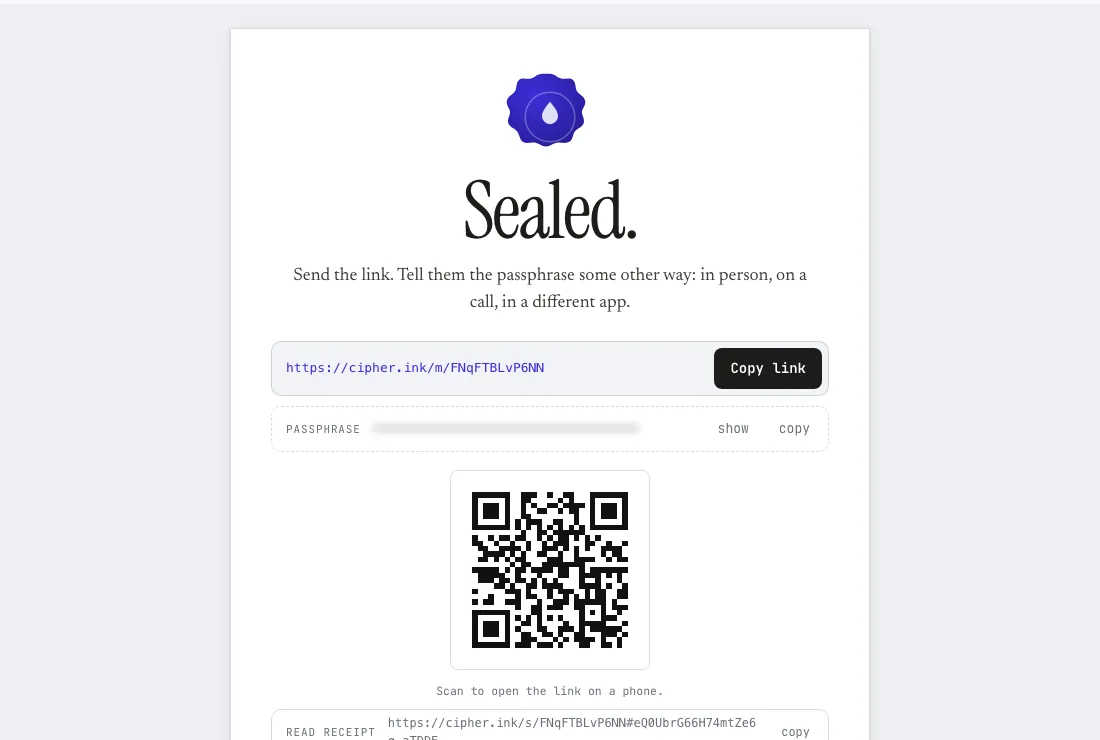
After you seal a message, the Sealed. card has a QR code button. Pressing it draws the code from the link on a canvas in your browser. It uses a small open-source library (qrcode-generator, MIT licensed) served from this site, so no outside service is called and no third party sees your link. The code is a picture of exactly the text next to it:
- In secret-link mode, the link looks like
https://cipher.ink/m/…#…with a key () written in 43 characters after the#, the one part of a link that browsers never send to a server (why). The code holds all 77 characters, so scanning it opens the message with no passphrase. It's a small code, about 37 by 37 squares (QR version 5). - In passphrase mode, the link has no key. The code holds 33 characters (29 by 29 squares) and opens only the lock card, which still asks for the passphrase. Someone who gets the code gets nothing readable.
Using it safely
- Prefer passphrase mode if others can see the screen. The code is then harmless alone, and you give the passphrase some other way.
- Use burn after reading. If someone else scans first and opens the message, the person you meant it for sees "Burned". That tells you someone else read it, and you can send another. Without burn, the message can be read many times and you won't know by whom, except through the read counts on your receipt.
- Keep the code on screen for as short a time as you can. Cover it when you're done, and hide it with the Hide QR code button.
- Don't post or email the picture. A screenshot of a QR code is a copy of the secret link. Cameras in a room, a doorbell, a video call or a photo of your desk can all catch it.
- Delete screenshots after scanning, from the phone and from any cloud photo backup.
- Set a short expiry (10 minutes or an hour) to shrink the time in which a captured code is useful.
Shoulder surfing and cameras
"Shoulder surfing" means reading what's on someone's screen over their shoulder, in a café, an office or on a train. A QR code is easier to capture than typed text, because a phone can read it from several meters away in a fraction of a second, with nobody reading anything aloud. In a public place, treat a visible QR code as if you were holding the link up on a card. Do it somewhere private, or use passphrase mode and the lock card. In a meeting room or at a desk, a short expiry plus burn means a missed shot is of a code that has already stopped working.
Scanning other people's codes
The same fact works against you. A code printed on a poster, a parking meter or a letter can point anywhere, and a sticker can be placed over the real one. Criminals use this, and it's sometimes called "quishing" (QR phishing). A few habits help:
- Read the address before you open it. Your phone's camera shows the destination when it detects the code. If it isn't the site you expect, don't open it.
- Be wary of a code that asks for a login, a payment or a download, especially one that arrived unasked or sits on top of another sticker.
- Don't put a secret into a code you have no reason to trust. A QR code you receive that opens a cipher.ink message is only a link. Nothing in it runs on your device, and the page asks for the passphrase only on cipher.ink itself, so check that the address bar shows
cipher.ink.
When a QR code isn't worth it
For what a self-destructing message can and can't promise, see the comparison page.
If the other person is far away, a QR code gains nothing over sending the link, and it creates a picture that can be forwarded. Use it where its one advantage applies, which is no typing, because the camera does the copying, between two devices of yours or two people in the same place. Otherwise copy the link, and see how to send a password securely for the best ways to deliver it.
Common questions
Does the QR code contain the message?
No. It contains the link. The message stays encrypted on the server until someone with the link (and the passphrase, in passphrase mode) opens it.
Is the QR code generated on a server?
No. A script served from cipher.ink draws it in your browser from the link. The link, and so the key in a secret link, never goes to a QR-code service.
Can I use the code more than once?
Only if the message doesn't burn. A message set to burn is deleted when it's first opened, so the code works once.
Is a QR code safer than typing the link?
Not for secrecy. It's more convenient and easier to capture from a distance. Its advantage is avoiding typos and copying.