
Learn · Practical guides
How to send a password to someone securely
The honest options, ranked, and a step-by-step way to send a password as a one-time link that burns after reading, with the passphrase sent separately.
The safest way to send someone a password is through a password manager's sharing feature. Failing that, send a one-time link that expires and give them the passphrase over a different channel, like a phone call or a text. Don't paste it into an email or a Slack DM. That message sits in two inboxes for years, and one search for "password" finds it. Below: the real options ranked, then the second method step by step with cipher.ink. It takes about a minute.
Why email and chat are the wrong place
An email lands in your sent folder, the recipient's inbox, every backup of both, and a few mail servers on the way. Chat apps keep history on every signed-in device. Your password stays readable as long as any one of those copies survives, which is usually years. Whoever breaks into either mailbox later finds it with a single search.
Notice what the threat is. It isn't mainly a spy on the wire, since mail between big providers is usually encrypted in transit (see is email encrypted?). It's the pile of copies left behind, readable by the provider and by anyone who gets into either account.
Your options, best first
| Method | Good for | Watch out for |
|---|---|---|
| Password manager sharing (a shared vault or a sharing link) | Passwords you'll both keep using, like a family streaming account or a team login. The recipient stores it properly and you can rotate it later. | Both people need the same manager or a supported sharing feature. Limits differ by product and plan, so check yours. |
| A self-destructing link, passphrase sent separately (cipher.ink) | A one-off secret for someone who doesn't use your tools: a Wi-Fi password, a temporary login, a recovery code. Nothing to install, no account. | The link works for whoever opens it first. Send the passphrase by another route, and turn on burn after reading. |
| An end-to-end encrypted messenger with disappearing messages (Signal and similar) | People who already talk there. Messages are encrypted between devices and can expire on a timer. | The recipient can still copy the password, photograph the screen or keep a backup. Switch disappearing messages on before you send it. |
| Saying it on a phone call | Short passwords, for someone whose voice you know. | Easy to mishear, and bad anywhere you can be overheard. Never read out a code that someone who called you asks for. |
| Plain email, SMS or ordinary chat | Nothing that matters. | Many copies, readable by providers and by anyone who later gets into either account. |
All of this assumes the password protects something that matters. A throwaway login for a one-day event needs less care than a bank password. And for the bank case, you shouldn't be sending a password at all. Have the person set their own.
Sending it with cipher.ink
This turns the password into a message encrypted in your browser, so the server only ever holds scrambled data, then deletes it once it's read. The server never sees the text or the passphrase (how client-side encryption works).
- Write it. Type the password and, if it helps, what it's for. Keep the message short. If you can avoid it, leave the account name out.
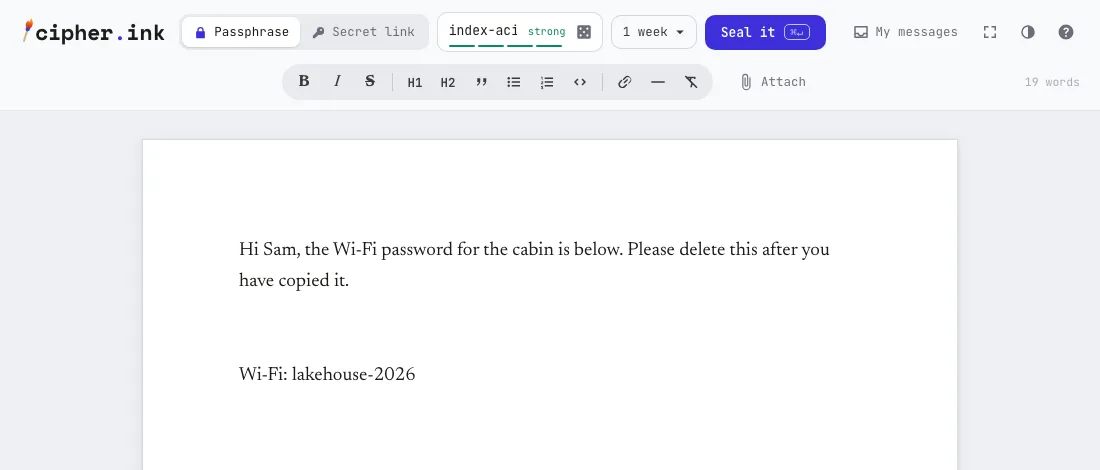
The writing page. The lock controls sit in the header: Passphrase needs a phrase that you tell the person separately, Secret link puts the key in the link. The dice button invents a strong passphrase. - Lock it with a passphrase. For a password this is the better mode, because the link alone then isn't enough to read it. Press the dice for something like
armor-lunar-amber-saffron-prism-97, or type your own and watch the strength meter. The dice use the browser's secure random generator (random numbers in the browser). - Set the options. Open the dropdown next to Seal it. Turn on Burn after reading, so the message is deleted the moment it's opened, and pick a short Destroy after, say 10 minutes or an hour, in case nobody opens it. The passphrase hint is optional and is not encrypted, so never put the passphrase in it. The page refuses if you try.
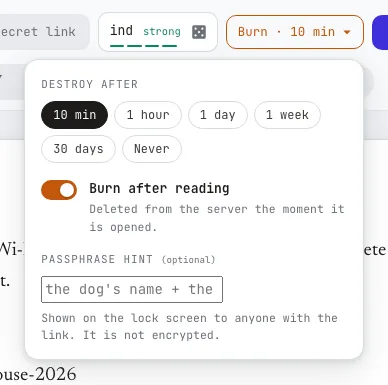
The options. A short expiry and burn after reading limit how long the link is useful. - Seal it (or press Command or Control plus Enter). The text becomes ciphertext in your browser, and the Sealed. card shows the link, the passphrase (blurred until you ask) and a private read-receipt link.
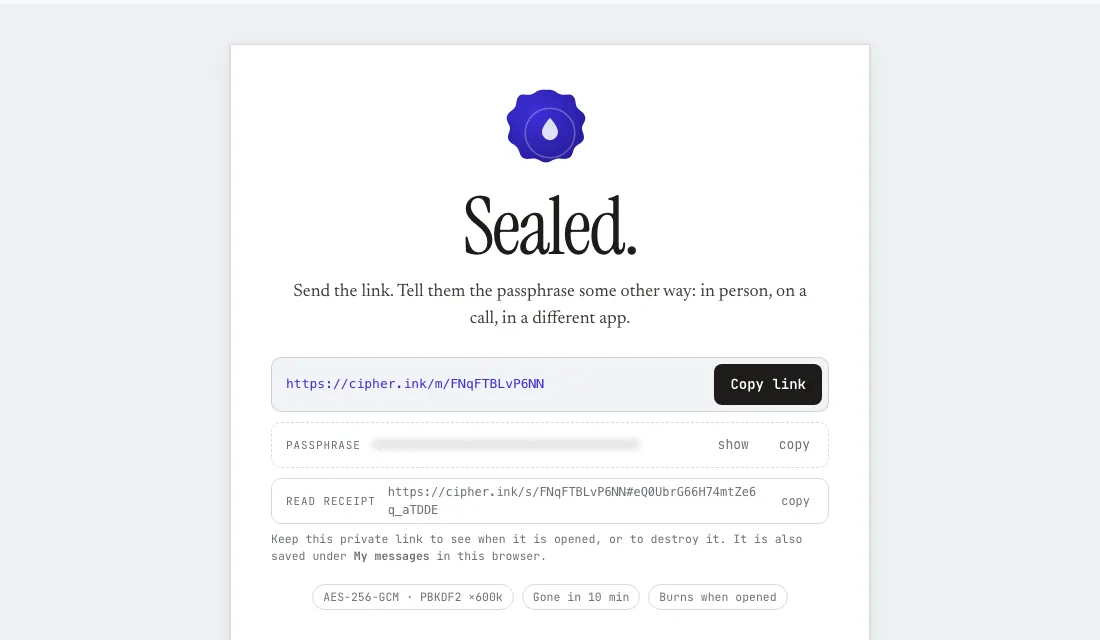
The sealed card. Send the link by one route; give the passphrase by another. The link and QR code in the picture belong to a demo message that expired ten minutes after the screenshot was taken; they open nothing now. - Send the link and the passphrase by different routes. This is the step that does the work. Link by email, passphrase by phone call or text. Someone who sees only one of them learns nothing, so don't put both in the same thread.
- Check that it was read. Keep the read-receipt link, or open My messages, which lists what you sealed from this browser and whether each one was opened. When it says Opened and burned, it's gone from the server.
What they see on the other end
They open the link and get a lock card: when the message was sealed, when it deletes itself, a warning if it burns on opening, and your hint if you gave one. They type the passphrase and the message appears on a white page, and if it was set to burn, it's deleted from the server right then. A wrong passphrase just fails, and they can try again. Then they should copy the text straight into their password manager.
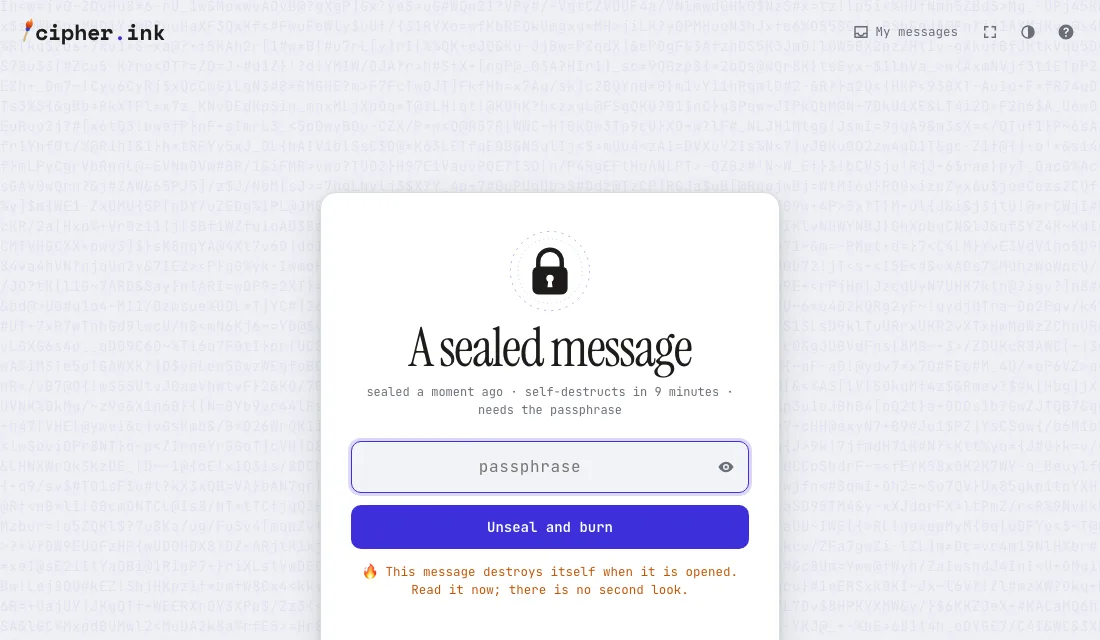
Afterwards
Treat a password you chose and sent as temporary. Where the service allows it, send a one-time password or a setup link that makes them pick their own. Then clean up on your side: wipe the password from your notes and clipboard.
And watch the receipt. If it says Opened before the person tells you they have it, someone else got there first. Change the password at once.
What this can't do
Nothing protects you from the person at the far end. They can copy the password, store it badly or forward it. Burn after reading stops the server from keeping it, but it can't stop someone holding both the link and the passphrase from opening it first, which is why those two travel separately.
There's also the code itself. Your browser gets the encrypting code from the website each visit, so you're trusting the site not to serve altered code. The security page spells out what the server can and can't see, plus the known weak spots. For a high-stakes secret between people who can meet, or who already use an end-to-end encrypted app, use that instead.
Common questions
Can I put the link and the passphrase in the same message?
No. That defeats the point, because anyone who reads that one message can open the secret. Use two routes: email for the link, a text or a call for the passphrase.
What if they don't open the link in time?
It deletes itself when its timer runs out, opened or not. Seal another one. The read-receipt page shows whether the first was opened or expired.
Can I send one password to a group?
You can, but a message that burns after reading opens for only one person. For several people, use a longer expiry without burn, or put the password in a shared password-manager vault.
Does cipher.ink keep a copy of my password?
It keeps the encrypted message until it's opened or expires, then deletes it. A small record that the link existed stays for 90 days, so the link can say "Burned" instead of "not found". The server has no way to read the contents.